
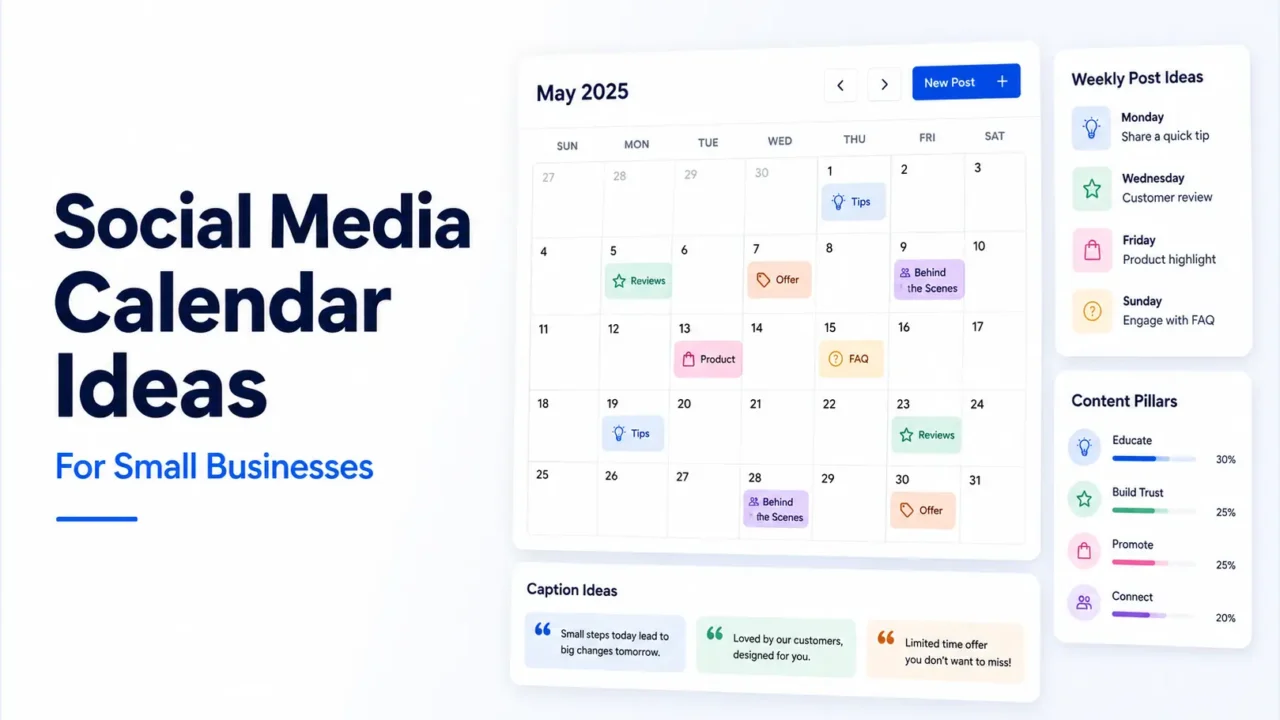

Social media calendar ideas help small businesses plan what to post without starting from a blank page every week. A good calendar should include educational posts, product or service posts, customer proof, behind-the-scenes content, offers, community updates, and engagement posts.
For small businesses, the best calendar is simple. You do not need a complex 30-day campaign with too many moving parts. You need a clear weekly rhythm that helps customers understand your business, trust your work, and know what to do next.
Use the ideas below to build a monthly social media calendar that feels useful, balanced, and realistic for your team.
TL;DR
- Use 4 to 6 recurring content types so your calendar stays balanced.
- Plan content around customer questions, product use cases, reviews, offers, and behind-the-scenes moments.
- Create a weekly posting rhythm, then repeat it with new topics each week.
- Keep a few open slots for trends, customer questions, local updates, or urgent announcements.
- Do not fill the calendar with only promotional posts.
- Before publishing captions, check length and line breaks with platform-specific tools.
Why Small Businesses Need a Social Media Calendar
A social media calendar gives your posting plan a clear structure. Without one, many small businesses post only when they remember, when they have an offer, or when they feel pressure to “stay active.” That usually leads to a feed that feels random.
A calendar fixes that by giving every post a purpose. Some posts teach. Some build trust. Some show proof. Some promote an offer. Some invite conversation. When those pieces work together, your social media page becomes easier to manage and more useful for customers.
Social media also remains a major part of online behavior. DataReportal reports that there were 5.79 billion social media user identities worldwide at the start of April 2026, while noting that “user identities” do not always equal unique people. For small businesses, the practical point is simple: your customers are likely checking social platforms before they buy, book, visit, or send a message.
How to Use These Social Media Calendar Ideas
Start by choosing how many posts you can create each week. For many small businesses, 3 to 5 posts per week is enough. You can add Stories, quick updates, or reposts when you have extra time, but the main calendar should match your real capacity.
Then choose a few content categories and repeat them each week with new topics. For example, Monday can be a tip, Wednesday can be customer proof, and Friday can be an offer or update. This gives you a structure without making every week look identical.
If you want a broader planning workflow, read the related guide on how to build a social media content calendar. For more post-level inspiration, you can also use these social media content ideas for small businesses and social media post ideas for Instagram, Facebook, LinkedIn, and TikTok.
30 Social Media Calendar Ideas for Small Businesses
Use these ideas as a monthly content bank. You can publish all 30 across a month, or choose the strongest 12 to 20 based on your posting schedule.
1. Answer a Customer Question
Turn one common customer question into a post. This could be about pricing, delivery, booking, product size, service process, turnaround time, payment, or custom orders.
Example: “How early should you book a birthday cake?” A simple answer can reduce repeated DMs and help new customers make decisions faster.
2. Share a Product or Service Tip
Create a helpful tip that teaches people how to choose, use, maintain, or prepare for your product or service. This works for almost every business type.
A salon can post hair care tips. A bakery can post cake storage tips. A photographer can post photoshoot prep tips. A consultant can post one mistake to avoid before hiring help.
3. Show a Behind-the-Scenes Moment
Behind-the-scenes posts make your business feel active and real. Show order packing, workspace setup, product preparation, team planning, service delivery, or your creative process.
Keep the caption short and specific. Tell people what they are seeing and why it matters.
4. Post a Customer Review
A review post builds trust without making a hard sales pitch. Use a short quote, screenshot, or simple review graphic.
Ask permission before sharing names, photos, or private customer details. If you use a screenshot, remove anything personal that does not need to be public.
5. Create a Product Highlight
Pick one product or service and explain who it is for. Do not only list features. Show when someone should choose it.
Example: “Our mini gift box is best for small thank-you gifts, office giveaways, and simple birthday surprises.”
6. Share a Before-and-After Result
Before-and-after content works well for service businesses, creators, designers, cleaners, fitness coaches, beauty professionals, and home improvement businesses.
Explain the starting problem, what changed, and what the final result shows. Keep it clear and honest.
7. Add a Weekly FAQ Post
Choose one question each week and answer it in a short post. This can become a recurring calendar slot.
Examples include delivery timing, booking process, refund rules, custom options, appointment prep, file requirements, sizing, or care instructions.
8. Post a Customer Story
A customer story gives more context than a basic review. Share what the customer needed, how your business helped, and what the outcome was.
Keep it short. Focus on the useful lesson or moment, not private customer details.
9. Share a Local Update
Local businesses should include local context in the calendar. Post about market days, holiday hours, weather-related updates, delivery areas, local collaborations, or community events.
Local posts help nearby customers know when and how to reach you.
10. Create a Poll or Voting Post
Ask your audience to vote on something simple. This could be a product color, restock choice, next topic, event time, package option, or new design.
Polls work well because they are easy to answer. The results can also give you future content ideas.
11. Share a Short Tutorial
Teach one small thing in a carousel, short video, or image post. Do not try to teach everything in one post.
Examples: “How to measure for the right size,” “How to prepare for a service visit,” or “How to choose the right package.”
12. Post a Myth vs Fact
Use this when customers often misunderstand your product, service, or industry.
Example: “Myth: You only need a website when your business is big. Fact: A simple website can help customers trust you even when your business is small.”
13. Share a Founder Note
A founder note adds a human voice to the calendar. Share why you started, what you learned, what changed in your process, or why you made a business decision.
Keep it honest and useful. It should not feel like a personal diary with no point for the reader.
14. Announce New Arrivals
Use a simple announcement post when you launch a product, add a service, restock an item, or update your menu.
Mention what is new, who it is for, when it is available, and how to order.
15. Share a Limited-Time Offer
Offers belong in your calendar, but they should not dominate it. Use them when there is a real reason to act.
Mention the offer, deadline, terms, and next step. Keep the wording clear so people do not need to ask basic questions.
16. Post a Checklist
Checklists are useful for planning, buying, booking, preparing, or comparing.
Examples: “Before you book a photoshoot,” “Before ordering a custom cake,” “Before hiring a cleaner,” or “Before launching a product page.”
17. Share a Comparison Post
Help customers choose between two options. This can reduce hesitation and make your offer easier to understand.
Examples: basic vs premium package, pickup vs delivery, one-time service vs monthly plan, small vs large size, or matte vs glossy finish.
18. Show Your Workspace
Workspace posts work well when the business has a visual process. Show your desk, studio, kitchen, shop, packing table, workshop, or planning board.
Use the caption to explain what is happening. A simple workspace photo becomes more useful when the context is clear.
19. Share User-Generated Content
If a customer shares your product or service, ask for permission to repost it. User-generated content adds social proof and gives your calendar a more natural feel.
Do not edit the customer’s words too heavily. Keep the post authentic.
20. Create a “Save This” Post
Make a post that people may want to save for later. These work well for tips, templates, checklists, size guides, preparation steps, and examples.
Example: “Save this cake size guide before placing your next order.”
21. Share a Team Spotlight
Introduce a team member, their role, and one useful detail about their work. If you are a solo owner, use this format to introduce your own role in the business.
People often buy from small businesses because they trust the people behind them.
22. Post a Process Breakdown
Explain how your service works from start to finish. This is especially useful when people hesitate because they do not know what happens after they contact you.
Example: inquiry, quote, confirmation, payment, production, delivery, follow-up.
23. Share a Seasonal Post
Seasonal content gives your calendar timely relevance. Use holidays, school seasons, summer, winter, local events, wedding season, exam season, or business planning periods.
Make the seasonal angle fit your actual offer. Do not force unrelated holidays into the calendar.
24. Post a Short Customer Education Series
Create a 3-part or 4-part mini-series around one topic. This works well for service businesses, coaches, creators, and consultants.
Example series: “How to choose the right service package,” “How to prepare for your first consultation,” or “How to plan a product launch.”
25. Share a Mistake to Avoid
Mistake posts work well when they are specific. Avoid vague advice.
Example: “Do not order a custom print without checking the final size.” Then explain what can go wrong and how to avoid it.
26. Post a Weekly Recap
At the end of the week, share what happened. This could include orders shipped, events attended, client work completed, new products, or lessons learned.
Keep it brief. A weekly recap should feel like a useful update, not a long report.
27. Share a Story From a Real Order or Project
Use a real work moment as content. For example, a customer had a deadline, a product needed a custom detail, or a service required a special approach.
Remove private details and focus on the lesson, result, or process.
28. Post a Community Question
Ask your audience something related to your niche.
Examples: “What should we restock next?” “Which design do you prefer?” “What question should we answer this week?” “What is your biggest challenge with [topic]?”
Use the answers to plan future posts.
29. Repurpose a Blog or Website Section
Turn a blog post, FAQ page, product description, or service page into social posts. This keeps your calendar full without creating every idea from zero.
For example, one blog section can become a carousel, a LinkedIn post, a short video, a Story sequence, and a Facebook page update.
30. Preview Next Month
End the month by telling people what is coming next. Mention upcoming products, events, service slots, content themes, or offers.
This gives your audience a reason to keep following and gives your next month a clear starting point.
A Simple Weekly Calendar Structure
A weekly rhythm makes your monthly calendar easier to build. You can repeat the same structure every week and change the topic, format, and platform.
| Day | Calendar Slot | Example |
|---|---|---|
| Monday | Educational tip | “How to choose the right size” |
| Tuesday | Behind the scenes | Packing orders or preparing service work |
| Wednesday | Customer proof | Review, result, before-and-after, or story |
| Thursday | FAQ or tutorial | Answer one buying or booking question |
| Friday | Offer or update | New arrival, restock, booking slot, or promo |
| Saturday | Engagement post | Poll, question, local update, or Story |
| Sunday | Review and plan | Check comments, save ideas, and plan next week |
You can reduce this to three posts per week if needed. For example, post education on Monday, customer proof on Wednesday, and an offer or update on Friday. A smaller calendar that stays consistent is better than a full calendar you abandon after a week.
Monthly Calendar Ideas by Content Pillar
Content pillars help your calendar stay balanced. They also make planning faster because you know what type of idea you need for each slot.
| Content Pillar | Goal | Calendar Ideas |
|---|---|---|
| Education | Teach and build trust | Tips, tutorials, checklists, FAQs, mistakes |
| Product or Service | Explain what you sell | Highlights, demos, use cases, comparisons |
| Proof | Show credibility | Reviews, testimonials, results, customer stories |
| Behind the Scenes | Show real work | Packing, process, workspace, team, preparation |
| Engagement | Start conversation | Polls, questions, votes, community posts |
| Promotion | Drive action | Offers, launches, booking slots, restocks |
Sprout Social’s 2025 Content Benchmarks Report says content remains central to brand social strategy across industries and networks. For small businesses, content pillars turn that idea into a practical calendar structure: each pillar gives your page a different job.
Social Media Calendar Example for One Month
Here is a simple 4-week content calendar for a small business that posts five times per week.
| Week | Monday | Tuesday | Wednesday | Thursday | Friday |
|---|---|---|---|---|---|
| Week 1 | Tip post | Behind the scenes | Review | FAQ | Offer |
| Week 2 | Tutorial | Product highlight | Customer story | Poll | New arrival |
| Week 3 | Mistake to avoid | Process post | Before-and-after | Checklist | Booking update |
| Week 4 | Comparison post | Workspace post | User-generated content | FAQ video | Monthly recap |
This structure gives your month a healthy mix of education, proof, personality, engagement, and promotion. You can use the same plan for Instagram, Facebook, LinkedIn, and TikTok, but each platform needs a slightly different format.
For example, a tutorial can become an Instagram carousel, a Facebook text post, a LinkedIn lesson, and a TikTok short video. The core idea stays the same, but the format changes.
Caption Ideas for Your Calendar
A calendar is easier to use when you prepare caption starters in advance. These short templates can help you write faster.
Educational Tip Caption
“Here is one thing to check before [buying/booking/ordering]: [tip]. It matters because [reason]. Save this for the next time you need [result].”
Customer Proof Caption
“A recent customer needed [problem]. We helped by [solution]. The result: [simple outcome]. Thank you for trusting us.”
Behind-the-Scenes Caption
“A quick look at how we prepare [product/service]. This step matters because [reason].”
Offer Caption
“[Offer name] is available until [date/time]. It includes [detail]. To order, send us [specific information].”
FAQ Caption
“Question: [customer question]. Answer: [clear answer]. If you are unsure, send us [detail], and we will guide you.”
Before publishing, check your caption length and formatting. Use the Instagram character counter for Instagram captions, the Facebook character counter for page updates, the LinkedIn character counter for professional posts, and the TikTok caption counter for short video captions.
Related Posts to Plan Better Content
If you want a full planning workflow, read Social Media Content Calendar: How to Plan Posts for a Month. It explains how to choose goals, pillars, weekly themes, captions, assets, and scheduling steps.
For a bigger list of post topics, use Social Media Content Ideas for Small Businesses. If you want platform-specific examples, read Social Media Post Ideas for Instagram, Facebook, LinkedIn, and TikTok.
Common Mistakes to Avoid
Do not fill your calendar with only offers. People need useful posts, trust signals, and clear answers before they are ready to buy. A calendar with only promotions can make your page feel repetitive.
Avoid copying the same caption to every platform. A LinkedIn post may need more context, while a TikTok caption may only need a short hook. Instagram captions need clean spacing, and Facebook posts often work better with a simple local or community angle.
Also avoid planning too far ahead without leaving space for real-time content. Customer questions, product updates, local events, and relevant trends may appear during the month. Keep a few empty slots so your calendar can respond to what is actually happening.
FAQs
What should a small business include in a social media calendar?
A small business calendar should include educational posts, product or service posts, reviews, behind-the-scenes content, FAQs, offers, and engagement posts. It should also include the posting date, platform, format, caption, and status.
How many social media posts should a small business plan per month?
Start with 12 to 20 strong posts per month if you have a small team. If you can create more without lowering quality, add Stories, short videos, polls, and repurposed content.
What are good weekly social media calendar ideas?
A simple weekly plan can include one tip, one behind-the-scenes post, one customer proof post, one FAQ, and one offer or update. This gives your calendar a balanced rhythm.
How do I create a monthly content calendar quickly?
Choose 4 to 6 content pillars, set a weekly rhythm, write down customer questions, add product or service topics, then fill the calendar with tips, reviews, offers, and behind-the-scenes posts.
Should I use the same calendar for every platform?
You can use the same core calendar, but adjust the format for each platform. One idea can become an Instagram carousel, Facebook update, LinkedIn post, or TikTok video.
What is the easiest content calendar tool for small businesses?
A simple spreadsheet is enough for many small businesses. Use columns for date, platform, topic, format, caption, asset, status, and notes.
Final Takeaway
A good social media calendar gives your small business a clear posting rhythm without making your content feel forced.
Start with customer questions, product details, reviews, behind-the-scenes moments, and simple offers. Then organize those ideas into a weekly plan you can actually maintain.
2 comments