
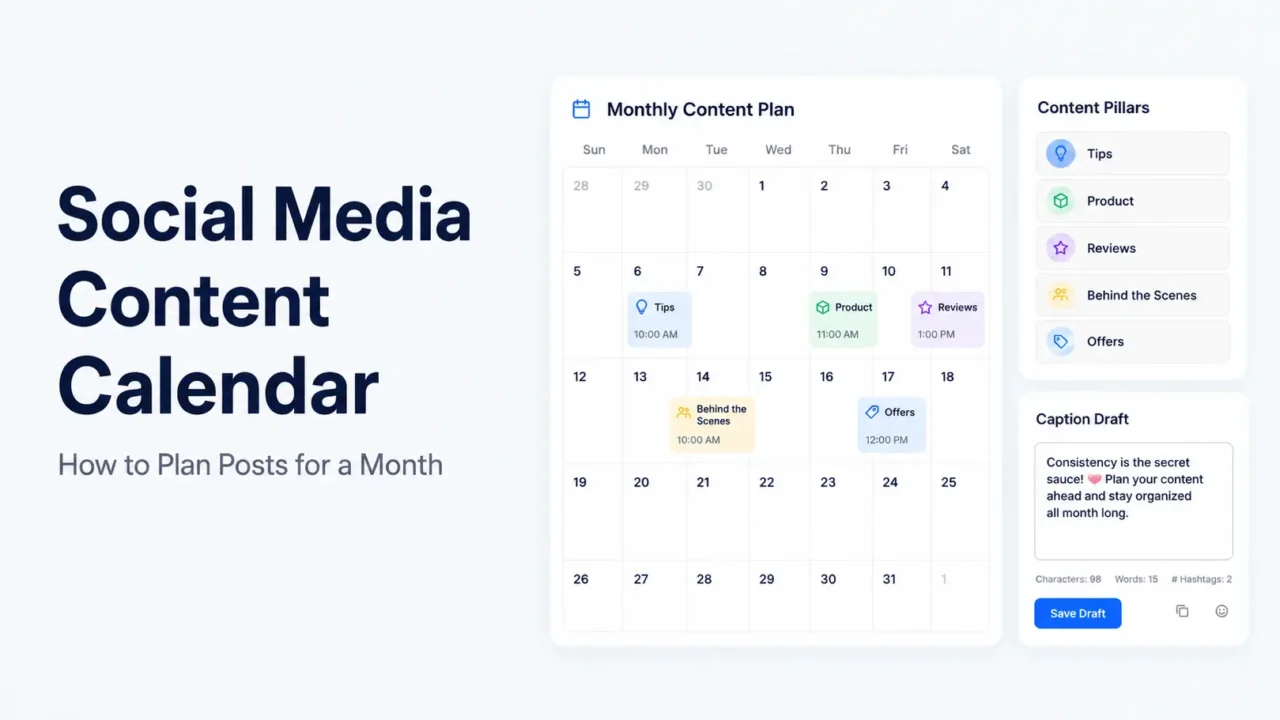

A social media content calendar is a monthly plan that shows what you will post, where you will post it, and when each post will go live. It keeps your content organized, but it should not make your social media feel stiff.
For a one-month plan, start with your goal, choose 3 to 5 content pillars, decide your posting frequency, map weekly themes, write captions in batches, and leave space for timely updates. The goal is not to fill every empty box. The goal is to publish useful content with less last-minute pressure.
A good monthly calendar works best when it includes a mix of educational posts, product or service posts, customer proof, behind-the-scenes content, offers, and engagement posts.
TL;DR
- A social media content calendar helps you plan posts for a full month before the month starts.
- Start with one clear monthly goal, such as awareness, leads, sales, signups, or community growth.
- Use 3 to 5 content pillars so your posts stay focused and balanced.
- Plan weekly themes, then fill each week with post formats like tips, FAQs, Reels, carousels, stories, reviews, and offers.
- Leave a few open slots for trends, news, customer questions, or urgent updates.
- Before publishing, check captions with platform-specific counters so your posts are clear, readable, and not too long.
Why a Social Media Content Calendar Matters
A content calendar gives your social media work a clear structure. Without one, most teams post only when they remember, when something urgent happens, or when they are trying to sell something. That usually creates an unbalanced feed.
Social media is too active to manage only by memory. DataReportal reported 5.79 billion social media user identities worldwide at the start of April 2026, which shows how deeply social platforms are now part of daily online behavior. For businesses and creators, a calendar creates order inside that busy environment.
A calendar also gives you a better way to plan quality. Sprout Social’s 2025 Content Benchmarks Report says content remains central to brand social strategy across industries and networks. That means planning is not only about posting more. It is about choosing what deserves space on the calendar.
What to Include in a Monthly Social Media Content Calendar
A monthly content calendar should show the basic details needed to create, review, and publish each post. Keep it simple enough that you can actually use it every week. If the calendar needs too many fields, your team may stop updating it.
At minimum, include the post date, platform, content topic, format, caption status, asset status, owner, and publishing status. For a small business or solo creator, this can live in Google Sheets, Notion, Trello, Airtable, or even a simple spreadsheet.
A useful calendar usually includes these fields:
| Field | What It Means |
|---|---|
| Date | When the post will go live |
| Platform | Instagram, Facebook, LinkedIn, TikTok, Pinterest, YouTube, or others |
| Content pillar | The main theme behind the post |
| Post format | Reel, carousel, text post, Story, short video, poll, image, or link post |
| Topic | The actual post idea |
| Caption | Draft or final caption |
| Creative asset | Image, video, design, screenshot, or graphic |
| CTA | What the reader should do next |
| Status | Idea, draft, design, review, scheduled, published |
| Notes | Hashtags, links, mentions, or reminders |
Do not add every possible detail on day one. Start with the fields you need most. You can add more once the calendar becomes part of your workflow.
How to Plan Social Media Posts for a Month
Use this workflow to build a 30-day content calendar without making it too complicated.
1. Choose One Monthly Goal
Start with one main goal for the month. This goal will guide your topics, calls to action, and post formats. A calendar without a goal often turns into a random list of ideas.
Your goal might be brand awareness, product sales, lead generation, event promotion, community growth, email signups, website traffic, or customer education. For example, if your goal is to promote a new product, your calendar should include product demos, customer questions, behind-the-scenes posts, reviews, comparison posts, and clear offer posts.
Do not try to make every post sell. Some posts should build trust before people are ready to buy. A balanced calendar supports the buyer journey across the month.
2. Pick 3 to 5 Content Pillars
Content pillars are the main themes your posts will rotate through. They stop your calendar from becoming too repetitive.
For a small business, good content pillars might be educational tips, product or service highlights, customer proof, behind-the-scenes content, offers, and community posts. For a personal brand, the pillars might be lessons, opinions, case studies, resources, and personal stories.
Here is a simple example for a local bakery:
| Content Pillar | Example Post |
|---|---|
| Education | “How to choose the right cake size” |
| Product | “New chocolate fudge cake is available this week” |
| Customer proof | “A birthday cake review from last weekend” |
| Behind the scenes | “How we prepare custom cake toppers” |
| Offer | “Weekend discount on cupcake boxes” |
Keep your pillars close to what your audience already asks about. If customers keep asking the same questions in DMs, those questions deserve calendar slots.
3. Decide Your Posting Frequency
Posting frequency should match your capacity. A simple calendar that you can maintain is better than a packed calendar that fails after one week.
For most small teams, 3 to 5 feed posts per week is a practical starting point. You can use Stories, short updates, and reposts between those main posts if you have more capacity. If you post on multiple platforms, do not assume every platform needs the same number of posts.
Meta’s Facebook Page post guidance recommends clear messages, actionable posts, high-quality creative, and knowing your audience. That is a useful reminder when planning frequency. Posting more is not the goal if the message is weak.
4. Map Weekly Themes
Weekly themes make monthly planning easier. They give each week a focus while still leaving room for different post formats.
For example, a 4-week calendar could look like this:
| Week | Theme | Goal |
|---|---|---|
| Week 1 | Education and awareness | Teach the audience and answer basic questions |
| Week 2 | Product or service clarity | Explain what you offer and who it is for |
| Week 3 | Trust and proof | Share reviews, results, case studies, and stories |
| Week 4 | Offer and action | Promote a product, service, booking slot, or event |
This structure works well because each week has a role. The first two weeks prepare the audience. The last two weeks give proof and direction.
5. Fill the Calendar With Post Types
Once the themes are ready, add post types. This is where the calendar becomes practical.
Use different formats so your feed does not feel flat. For example, you can use carousels for education, short videos for behind-the-scenes content, image posts for customer proof, text posts for opinions, and Stories for polls or quick updates.
A strong monthly mix can include:
- Educational tips
- FAQs
- Short videos
- Product demos
- Customer reviews
- Behind-the-scenes posts
- Founder or team stories
- Polls and questions
- Comparison posts
- Offers or launches
- Event reminders
- Repurposed blog content
If you are planning for Instagram, Facebook, LinkedIn, and TikTok, shape the same idea for each platform. An educational tip can become an Instagram carousel, a Facebook page post, a LinkedIn lesson, and a TikTok short video.
6. Batch Write Captions
Caption writing is easier when you do it in batches. Pick one or two days to write captions for the next week or the full month. This gives you time to edit without rushing.
Write the caption around the platform and format. Instagram captions need spacing and a strong first line. Facebook posts often need clear context and a direct next step. LinkedIn posts should sound professional but human. TikTok captions should be short and support the video hook.
Before publishing, check length and line breaks using the right tool. You can use the Instagram character counter for Instagram captions, the Facebook character counter for page updates, the LinkedIn character counter for longer professional posts, and the TikTok caption counter for short video captions.
7. Create and Organize Assets
Your calendar should track creative assets, not only captions. A post may need a product photo, video clip, carousel design, screenshot, thumbnail, or customer quote graphic.
Create a simple folder system by month and platform. For example, use folders like “June Instagram,” “June TikTok,” or “June Launch Posts.” Keep final assets separate from drafts so the person scheduling the content does not publish the wrong file.
This is also the right time to check brand consistency. Use similar colors, font choices, logo placement, and design rules, but do not make every post look identical.
8. Review, Schedule, and Leave Open Slots
Review the monthly calendar before scheduling. Check that the content mix is balanced. If every post is promotional, add education and proof. If every post is educational, add clear offers or calls to action.
LinkedIn’s content calendar guidance recommends a flexible schedule, batching content, and leaving room for last-minute posts or trends. That advice fits most platforms because social media often changes during the month.
Keep a few open slots for timely posts. These could be customer questions, local events, product updates, trending topics, or urgent announcements. A content calendar should guide your month, not lock you into ignoring real opportunities.
A Simple 30-Day Social Media Content Calendar Example
Here is a simple monthly calendar structure for a small business posting five days per week. You can adjust the platforms and formats based on your audience and workload.
| Day | Content Type | Example Topic | Best Format |
|---|---|---|---|
| 1 | Educational tip | “How to choose the right product size” | Carousel or short video |
| 2 | Behind the scenes | “Packing today’s orders” | Reel, Story, or TikTok |
| 3 | Customer proof | “Review from a recent buyer” | Quote card or image post |
| 4 | FAQ | “How long does delivery take?” | Text post or short video |
| 5 | Offer | “Weekend discount or booking slot” | Image post or Story |
| 6 | Community post | “Which option should we restock?” | Poll or question |
| 7 | Buffer day | No planned post or light Story | Flexible |
| 8 | Educational tip | “Common mistake to avoid” | Carousel |
| 9 | Product demo | “See how this product works” | Short video |
| 10 | Team story | “Meet the person behind the work” | Photo post |
| 11 | FAQ | “What details should customers send?” | Text post |
| 12 | Promotion | “New arrival or service package” | Image or video |
| 13 | Engagement | “Ask us anything” | Story or page post |
| 14 | Review day | Check comments and save ideas | Internal task |
| 15 | Tutorial | “Step-by-step mini guide” | Reel or carousel |
| 16 | Behind the scenes | “Workspace or process clip” | Short video |
| 17 | Customer story | “A customer problem and solution” | Caption post |
| 18 | Comparison | “Option A vs option B” | Carousel |
| 19 | Offer reminder | “Last day or limited availability” | Story or feed post |
| 20 | Local or community post | “Event, market, or local update” | Facebook or Instagram |
| 21 | Buffer day | Keep open for trends or updates | Flexible |
| 22 | Educational post | “Checklist before buying or booking” | Carousel |
| 23 | Product highlight | “Feature or benefit explained simply” | Image or short video |
| 24 | Customer proof | “Before-and-after or review” | Reel or image post |
| 25 | FAQ | “Pricing, booking, delivery, or support” | Text post |
| 26 | Sales post | “Clear CTA with product or service” | Feed post |
| 27 | Poll | “Vote on next topic or product” | Story or Facebook post |
| 28 | Repurpose post | Turn a blog or review into a post | Any format |
| 29 | Monthly recap | “Best moments from this month” | Reel or carousel |
| 30 | Planning post | “What is coming next month” | Feed post or Story |
You do not need to publish all 30 days. This example gives you a full planning view. If your real schedule is 12 posts per month, use the strongest ideas and leave the rest as backups.
Monthly Content Calendar Template
Use this simple template to plan your month in a spreadsheet or project tool.
| Date | Platform | Pillar | Format | Topic | Caption Status | Asset Status | CTA | Owner | Status |
|---|---|---|---|---|---|---|---|---|---|
| June 1 | Education | Carousel | Product size guide | Draft | Design needed | Save this post | Riyadh | In progress | |
| June 3 | FAQ | Text post | Delivery timing | Final | Not needed | Message us | Riyadh | Ready | |
| June 5 | TikTok | Behind the scenes | Short video | Packing orders | Draft | Video recorded | Follow for more | Riyadh | Editing |
| June 7 | Proof | Text post | Client result story | Draft | Screenshot needed | Book a call | Riyadh | In progress |
This template works because it connects the idea to execution. You can see what needs writing, what needs design, and what is ready to schedule.
Content Pillars You Can Use Every Month
Your monthly calendar should not start from a blank page. Reuse a few strong pillars every month and change the topics inside each pillar.
For most brands, these pillars work well:
| Pillar | Purpose | Example |
|---|---|---|
| Education | Teach the audience | “3 things to check before buying” |
| Proof | Build trust | Review, testimonial, result, case study |
| Product or service | Explain the offer | Feature, use case, demo |
| Behind the scenes | Show real work | Packing, process, workspace, team |
| Engagement | Start conversation | Poll, question, vote, challenge |
| Promotion | Drive action | Offer, launch, booking, restock |
Use promotion as part of the mix, not the whole calendar. People follow brands for useful updates, trust, and relevance, not constant sales messages.
How to Repurpose One Idea Across a Month
Repurposing keeps your calendar easier to manage. One strong idea can become several posts if you change the angle and format.
Example idea: “How to choose the right service package.”
You can turn it into:
- An Instagram carousel explaining each package
- A Facebook FAQ post answering the most common pricing question
- A LinkedIn post about why clear packages reduce buyer confusion
- A TikTok video showing what is included in each package
- A Story poll asking which package people want to learn about
- A customer story showing which package solved a real problem
This approach gives your audience several ways to understand the same topic. It also reduces the pressure to invent completely new ideas every day.
Common Mistakes to Avoid
The biggest mistake is planning too many posts without enough time to create them well. A full calendar looks good, but weak captions, rushed visuals, and unclear calls to action can hurt the final result.
Avoid posting only offers, using the same caption everywhere, ignoring platform context, writing captions with no spacing, skipping review, and filling the calendar with random trends. Do not let AI-generated captions go live without editing. Add real details, customer language, product facts, and a clear next step.
Also avoid making the calendar too rigid. If a customer asks a great question or a useful trend fits your business, create space for it. A monthly plan should support real communication, not block it.
FAQs
What is a social media content calendar?
A social media content calendar is a plan that shows what you will post, where you will post it, and when each post will go live. It usually includes topics, platforms, formats, captions, assets, and status.
How do I plan social media posts for a month?
Start with one monthly goal, choose your content pillars, decide your posting frequency, map weekly themes, and fill the calendar with topics. Then write captions, create assets, review, and schedule.
How many social media posts should I plan per month?
Plan based on your capacity. A small team can start with 12 to 20 strong posts per month. If you can keep quality high, you can add more posts, Stories, and short videos.
What should I include in a content calendar?
Include date, platform, content pillar, post format, topic, caption status, asset status, CTA, owner, and publishing status. Keep the fields simple so the calendar stays easy to use.
Should I post the same content on every platform?
You can use the same core idea, but adjust the format and caption for each platform. A TikTok video, Instagram carousel, Facebook update, and LinkedIn lesson should not read the same.
What is the best tool for a social media content calendar?
Use the tool you will actually maintain. Google Sheets, Notion, Trello, Airtable, and scheduling tools can all work. A simple spreadsheet is enough for many small teams.
Final Takeaway
A social media content calendar works best when it gives your month a clear plan without removing flexibility.
Choose your monthly goal, build around a few content pillars, plan weekly themes, and batch your captions and assets. Then keep a few open slots for real customer questions, timely updates, and ideas that appear during the month.
One comment